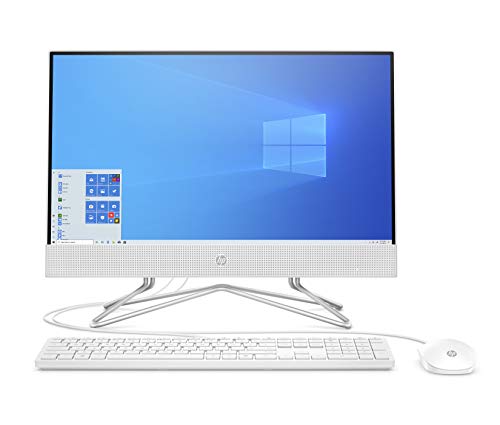
Introduction to All-in-One Desktop Computers
All-in-one desktop computers (AIOs) combine the components of a traditional desktop PC—monitor, CPU, and often speakers—into a single unit. This design saves space and minimizes cable clutter, making AIOs a popular choice for home and office environments. This guide explores the key features, benefits, popular types, and considerations when choosing an all-in-one desktop.
Key Features of All-in-One Desktop Computers
1. Integrated Design
AIOs have a sleek, compact design that integrates the monitor and computer hardware into one unit. This reduces the need for a separate tower, offering a more streamlined look for any workspace.
2. Display Quality
Most all-in-one computers feature high-resolution displays, with options ranging from Full HD (1920 x 1080) to 4K UHD (3840 x 2160). These screens provide vibrant visuals and excellent color accuracy, ideal for multimedia tasks.
3. Touchscreen Options
Many AIOs offer touchscreen capabilities, allowing for intuitive navigation and interaction with applications, which is particularly beneficial for creative work and presentations.
4. Performance Specs
All-in-one desktops come with various performance options, including:
Processors: Ranging from Intel Core i3 to i9 or AMD Ryzen equivalents for different levels of processing power.
Memory (RAM): Options typically range from 8GB to 32GB, allowing for smooth multitasking.
Storage: Choices between traditional HDDs, faster SSDs, or hybrid solutions that combine both.
5. Connectivity Options
AIOs generally provide multiple ports for connectivity, including USB-C, USB-A, HDMI, and Ethernet, allowing for versatile use with peripherals and external displays.
Benefits of All-in-One Desktop Computers
1. Space-Saving Design
With everything integrated into one unit, AIOs take up less space than traditional desktop setups, making them ideal for small offices or home environments.
2. Reduced Cable Clutter
The all-in-one design minimizes the number of cables, resulting in a cleaner and more organized workspace.
3. Ease of Setup
Setting up an AIO is typically straightforward—just plug it in, connect to power, and you’re ready to go, making it user-friendly, especially for non-tech-savvy users.
4. Modern Aesthetics
AIOs often feature a sleek and modern design, making them visually appealing additions to any office or home décor.
5. Versatility
All-in-ones can be used for a variety of tasks, including office work, multimedia consumption, gaming, and creative projects, depending on the specs.
Popular Types of All-in-One Desktop Computers
1. Business AIOs
Designed for productivity, these models often include features like enhanced security options, powerful processors, and collaboration tools for office environments.
2. Multimedia AIOs
Focused on entertainment, these computers come equipped with high-resolution displays, premium audio systems, and powerful graphics capabilities for gaming and media consumption.
3. Creative AIOs
Tailored for graphic designers, video editors, and artists, these AIOs typically offer high-end performance specs, color-accurate displays, and touchscreen functionality for creative software.
4. Budget AIOs
These models provide essential features at a lower price point, making them suitable for everyday tasks like browsing, word processing, and basic media consumption.
Considerations When Choosing an All-in-One Desktop
Performance Needs: Assess your primary tasks—whether for gaming, graphic design, or basic office work—to choose an AIO with appropriate specs.
Display Quality: Look for higher resolutions and quality panels, especially if you plan to use the AIO for creative work or media consumption.
Upgradeability: Check if the AIO allows for upgrades, such as additional RAM or storage, to extend its lifespan.
Price Point: Set a budget, as AIOs can range significantly in price depending on features and performance.
Brand and Warranty: Consider reputable brands that offer good customer support and warranty options to ensure reliability.
Conclusion
All-in-one desktop computers offer a blend of style, functionality, and performance, making them an excellent choice for various users, from students to professionals. By understanding the key features and benefits of AIOs, you can make an informed decision that suits your computing needs and enhances your workspace.